This was a bit of inspiration I had in October 2025 about Lib-Ray, and I want to get this written down as a plan. I’ve spent some more time fleshing the ideas out a bit, well into 2026.
Mitaka Architecture Elements
Overview
This is my third and hopefully-final attempt at a software architecture for the reference implementation of a player for Lib-Ray media.
Note that Lib-Ray was never intended to be a software project. It was about the format for the media, with an intended use of playback. The reference implementation will be provided as a guide to future implementers of players, who may opt for a totally different software architecture if they choose.
I know there will be many critics, principally of how long it has taken me to come up with this solution. I can only offer my sincere apology for that — it’s a been a very busy time, with many shocks, and my initial concept did not pan out as well as I had hoped. It was not as easy as it looked to me at the time. I will append a brief history at the end of this article. Until then, I’m just going to skip that and pretend no time has passed, so we can get on with the current plans.
The Mitaka architecture goes back to the roots of the Lib-Ray concept in using web standards to define on-disc menus for media. It conceives of the software as a “captured web application” running on the user’s computer.
It is possible to replicate almost all of the features of DVD or Blu-Ray movies using HTML, CSS, and JavaScript. The main reason for the “almost” is that DVD and Blu-Ray menus do have superior performance for animated/video elements in menus, though these have seen limited use by publishers.
It is possible to do animation in HTML pages, of course, but usually requires software running in the browser to do it. This is a low priority for me, so initial prototype releases probably won’t offer much here, and menus will likely need to be static. If this all goes well, then I might address that in a second version.
Starting Up
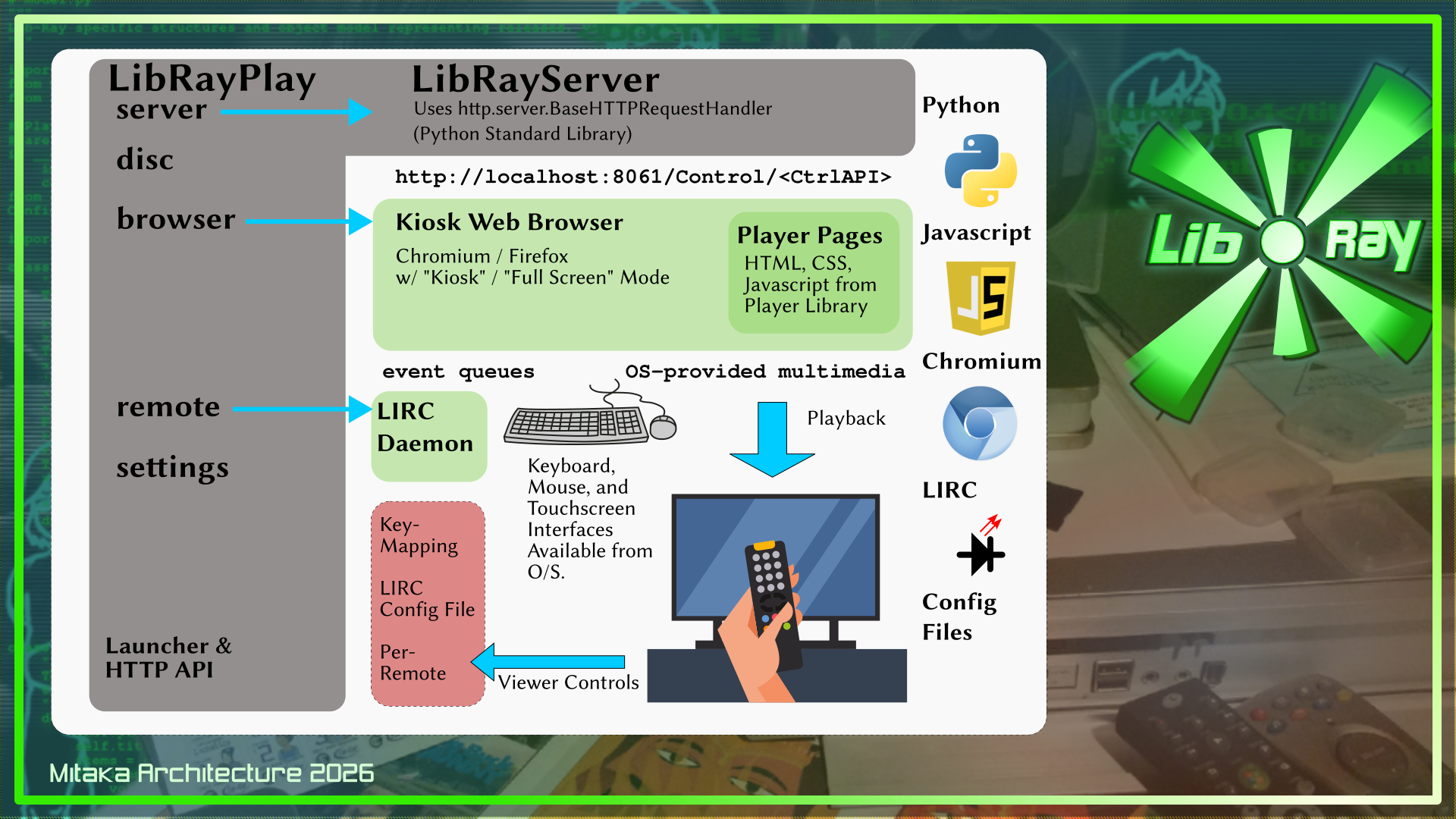
When the player is started, it will begin by launching a server object, LibRayServer, which is really part of the same program. This will provide a local socket that the browser can attach to. In the diagram above, I have this set to port 8061, because it doesn’t seem to be widely used. This should be configurable.
The program will then launch a web browser in “kiosk mode” to provide the front end. For prototyping purposes, I intend to use Chromium, which is fast and has good support for the features I need. I would also like to test with Firefox. Both programs appear to offer a suitable kiosk mode. I am also intrigued by the Servo web browser project, but I do not know much about it at this time (including whether it has or will have a kiosk mode). The attraction to these three software is that they use independent web parsing and display engines, so we avoid the “single vendor” problem.
And in addition, the program will launch the LIRC daemon to capture IR remote control input, if it is not already running.
When a video is launched from the Lib-Ray menu, a JavaScript/HTML player will be loaded into the browser to play it. This player will listen for remote-control input to provide playback, skip, chapters, and exit controls, which are all important for long-form video, such as feature films.
Note that Chromium, Firefox, Servo, and LIRC are all unmodified existing software in this design.
The JavaScript video player to be used for video format will initially be unmodified, although I might need to make changes to accommodate control by LIRC, meet other embedding concerns, or eliminate dependency on outside resources (no “phone home” stuff will be allowed).
Python Implementation Design
As blocked out in the diagram above, there will be a software “object” defined for each of these components to handle launch, shutdown, and re-launch of the components as necessary. There is also a “settings” object that loads the configuration file (probably an INI or YAML format file) for the player, as well as allowing these settings to be altered by the user, via player menus (and then written back out to disc).
Controls for the player will be accessible to the browser via a remote API. This is, for example, how you would set your language preferences for menus, audio, and subtitles.
Although it will be possible to alter configuration by directly editing the configuration file, the design will de-emphasize this. The assumption is that controls should be visible to the user through the browser (the main exception would be the socket settings for the server, since without that, the browser can’t see it).
The server software is the http.server module provided as part of the Python Standard Library. This was primarily intended to be used for testing, rather than “production” users. But it should be appreciated that “production” use of a web server means exposing it to requests from the outside world. We aren’t doing that — this is a captured web application, all running on the user’s system.
GenAI Note
Because every project has to have a statement about this nowadays: I do not intend to let an LLM get anywhere near this code. This will be written by me, using an “agile” / “test driven development” method, because I that’s how I learned.
I can’t vouch for the browser projects I’m relying on, but I don’t think I’ll be pushing the latest features on them, so you could just install an older, pre-agentic-workflow version of one of them, if you wanted to be fully LLM-free. I seriously doubt LIRC will change much, let-alone via LLM. It’s pretty much “mature” software at this point, I think. The only way I can really see this breaking down is if the video codec support in the browser is a problem.
HTTP Server
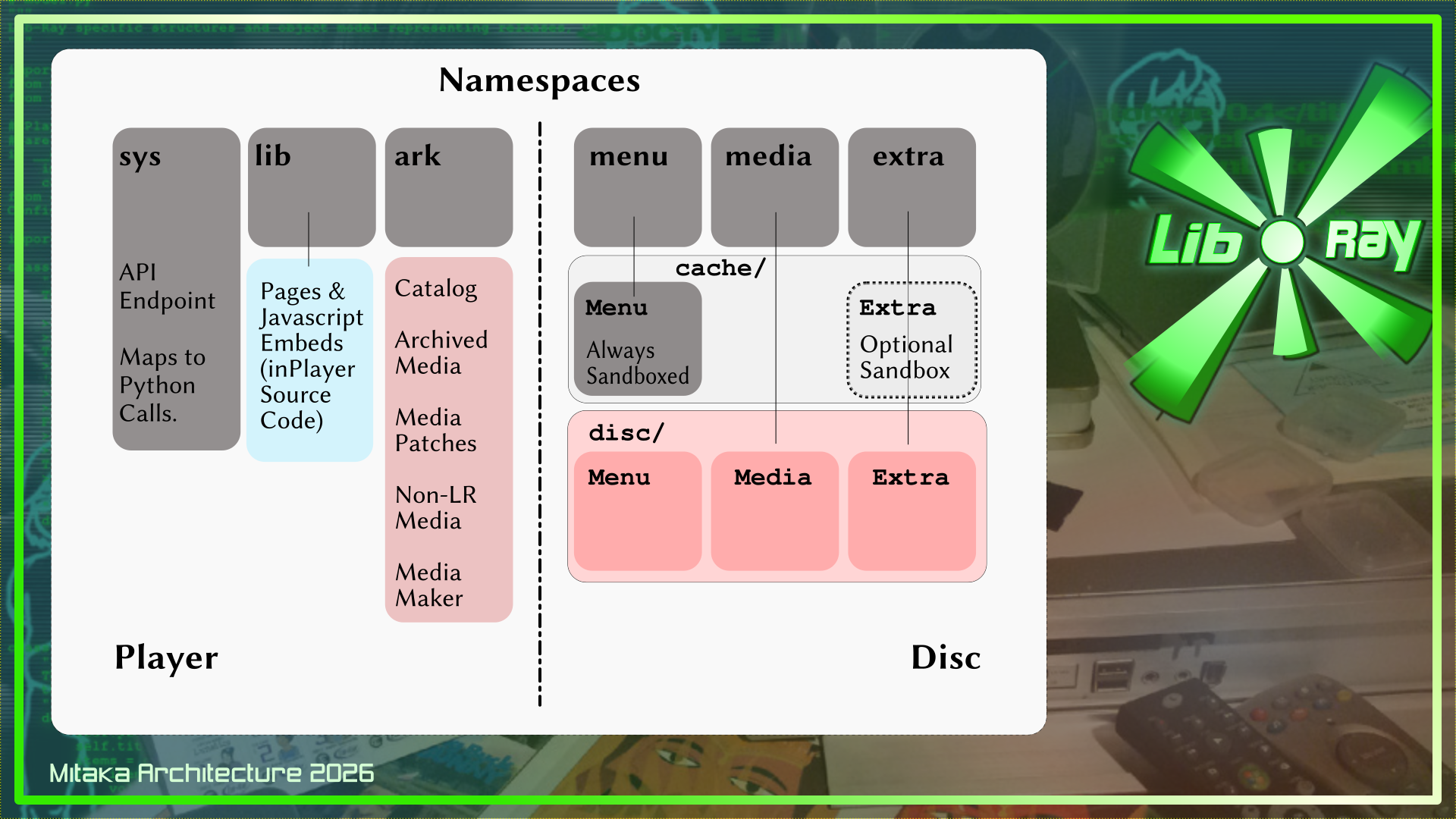
The server part of Mitaka will be a Python-program which uses (probably) the standard library http.server module to serve pages which the browser will read. The top level folders of the domain will be six namespaces, each treated differently to provide access to the player and the disc (or other Lib-Ray media) contents.
Lib-Ray Namespaces
The namespaces divide up the primary functions and security-zones for the player:
Player-Controlled Zones
These namespaces belong to the player or the user, and are not modified by the disc contents.
Sys
This is the API endpoint for the browser to call functions in the main LibRayPlayer software (which also provides the LibRayServer object). This is a bit like “CGI”, but in fact, the functionality will just be built directly into the server software.
Lib
This is a collection of HTML, CSS, and JavaScript files which can be accessed and referred to by Menu or Extra pages in the Lib-Ray disc. They provide functionality beyond what a bare HTML/CSS system can provide, but are part of the player distribution. This is part of eliminating any JavaScript or external links in the disc’s own HTML which might be used to spread malware or advertising, or to create dependency on external sites.
Ark
This is the user’s own collection of mirrored-media. When the player mirrors or copies a disc for later viewing, this is where it goes. It might also be used for disc-updates and non-Lib-Ray media content in the future. This is mainly reserved for future use, as the prototype player won’t make very much use of it.
Disc/Publisher-Controlled Zones
Each of these namespaces correspond to the top-level folders on a Lib-Ray disc, although the security concerns and treatment are different for each.
Menu
The menu system is essentially a “website on disc”. It is a collection of hypertext pages in the target 16×9 frame size, intended to be used in “kiosk mode”. It can contain JavaScript enhancements for offline viewing (i.e. to support people without LibRayPlayer software available, but these will be stripped and replaced by the player’s own “Lib” elements. Even without enhancements, though, the Menu can be browsed with a modern browser to provide partial menu and playback support, as long as the system will allow the browser to see the data on the disc.
When loading a disc, the player will make a copy of the entire Menu tree, stripping out unwanted content, interpolating localized labels and pages, and replacing JavaScript functionality with references to the Library software.
Media
The large multimedia files are stored here. This is mainly for the feature videos, audio, and subtitle tracks that are used for playback. There should be no HTML, CSS, or JavaScript in this folder. Only files of recognized types will be allowed by the player from this location.
Extra
This is intended as a catch-all for “DVD-ROM”/”BDR-ROM” content, HTML/CSS website-on-disc, and general data storage. For example, this is where the Blender source files for Lunatics episodes would be located on “Lunatics!” Lib-Ray releases. This area is, by design, more of a free-for-all and inherently less-secure. Player settings will allow the user to control whether and when content in the Extra folder will be trusted.
Other Folders / Possible Applications
Other folders on the disc will, by design, be ignored by the Lib-Ray player. This allows for some use-cases that may interest publishers, but are not strictly-speaking part of the Lib-Ray standard (except by this omission):
Replacement Sys, Lib, or Ark Folders
Since folders on disc will appear in the same relative location as the player folders to a regular web browser, a publisher could opt to provide their own substitutes for Player elements for users without access to a LibRay player software. These will be ignored by LibRayPlayer, so they are essentially harmless. But they may be useful, since LibRayPlayer software may not be widely available.
Hybrid-DVD Releases
LibRay ignores the VIDEO_TS and AUDIO_TS folders that DVD releases use. This means that, in some cases, for smaller Lib-Ray releases that can fit on DVD-size media, it is possible to create hybrid discs that will play in LibRayPlayer (with HD resolution and other features) as well as playing in a standard DVD or Blu-Ray player that supports DVDs. As far as I have been able to find out, DVD players ignore extra top-level folders on discs. These have been used for DVD-ROM content in the past, so presumably DVD players will treat the Lib-Ray data the same way.
Whether this will also work to make hybrid Blu-Ray releases is not something I have researched (I hope so, but I’m unsure).
HTML5-Based Javascript Video Player
The video player will use the HTML5 “video” element, with Javascript API enhancements to provide the full range of playback features expected for a home video player, including:
- Support for VP8 & VP9 video codec.
- Support for FLAC, OPUS, and OGG VORBIS audio codecs.
- Support for the MKV container format.
- Support for multiple-track video, audio, and subtitles.
- Advanced Substation Alpha subtitles.
- Matroska video chapter support.
This probably already exists. I’ve created a bookmarks list of a couple dozen JavaScript/HTML5 based video players. Initially I will just pick one and use it for testing. After I get it working, I will work on adapting it to work with LIRC and satisfy all my other requirements. Or, failing that, pick a different one that works better. Only if this fails entirely, would I write a new one from scratch. The other way this might fail is if the browser fundamentally limits video playback. If I run into that problem, I will probably escalate an issue to the affected browser’s bug tracker and either eliminate official support for that browser or simply live with the limitation for the time being. I am not going to attempt to rebuild the browser with a different video engine, though I will certainly welcome help from any developer who would like to contribute that to the project! I’m just trying to recognize my own limits, here.
10-Foot User Interface
The browser and video playback will need to be controlled by an infrared remote control to meet the full specification. As long as the features we need in the browser and video player components all have keyboard controls (“hot keys”), this should be something that can be provided with a good LIRC configuration file.
Launcher Process
When the program is started (or when an embedded player is powered on), the player’s software will launch the HTTP server, then launch the browser, and then check if lircd is running, and if not, launch that. Then it will attempt to auto-detect any discs loaded or offer to browse for a disc image on the player’s local storage media (this will allow for an on-disc library in the user’s defined “Ark” folder).
Alternatively, if the program is started on the command line, the target disc or path to a disc image may be provided by an argument (I intend to use this for testing, but it will continue to be useful for end-users, I think).
When a release image is found, the player will take steps to open it:
- It will read the catalog data from the “index.ini” or “index.yaml” file, and load the “cover.png” or “cover.jpg” image file for use in the player’s internal catalog database.
- It will filter and mirror the HTML+CSS menu system to a local storage.
- It will identify media files in the “media” namespace. These can also be used to aid in filtering the menus, as they should not refer to media that doesn’t exist.
- It will identify extra files, and scan them for potentially harmful content.
- An eject event will leave the menu system and clear the cache, unless the player has been set to retain data for the disc.
History
The idea behind “Lib-Ray” as a project is that is not actually a player project. It’s a specification for video releases on fixed digital media. It’s deliberately vague about the hardware medium for the data, so that it can be meaningfully defined on a USB stick, an SD card, or an optical disk. When I wrote up the project in 2012, there was no really good optical disc choice, so I suggested SD cards as the main hardware format. But that was a flawed choice (SD has limited shelf life compared to good optical media and also has built-in DRM features). Now, years later, we have the M-Disc recordable Blu-Ray media, and that’s a much better option, so I am suggesting that be the main hardware form. But it’s still not the main part of the specification — the hardware format is optional.
What matters is the filesystem, menus, video encoding, and quality assurance methods.
The purpose of the “Lib-Ray Player” is to be a proof-of-principle, and provide a means of testing the release format. Therefore, it is NOT my top priority that the player have many convenient features, nor that it has perfect playback. I leave those as challenges for anyone else who wants to improve on it. The “Lib-Ray Player” is for me simply a test-bed.
For the project, I adopted a simple code-name scheme, based on characters from the anime, Maison Ikkoku, partly because I just like it, but also because the characters all have numbers in their names, with the exception of Kyoko Otonashi, whose name instead means “quiet” — but that works as a zero. Which was also convenient.
To summarize these are architectures which I have tried:
Otonashi (2011/2012)
Simply use Chromium in full-screen mode on a 1920×1080 monitor to browse the menus, and play videos using VLC. This left full integration of playback out of consideration. So it wasn’t really a complete architecture, but it did allow for basic testing. Hence the “0” designation.
Ichinose (2012/2015)
The next attempt was to use the WebKit browser library and libvlc to try to create the full player integration. The problem was that Internet browsing and access was so deeply integrated into WebKit that keeping it secure as a local-only browser would be extremely difficult. I was very worried that I’d be unleashing a major security hazard, and so I balked at that. As time went on, I began to realize that I really needed to start over. My initial thought was that I needed to back off from trying to use browser technology directly.
Nikaido (2015-2024)
After that, I decided that, instead I would use a C++ HTML-based menu layout engine intended to be embedded in games, called “librocket”. This would still use “libvlic” for video playback. I very nearly had this working, but the software was very awkward to work with. Rocket wanted direct disc access to retrieve the files, which would make it awkward to do any sort of filtering on the menu documents (although not impossible). And integration with libvlc was awkward. The format that the game engine used wasn’t really HTML, either. It was “RML”, which was an XHTML-inspired format, but with notable syntax differences. I had originally intended to convert Lib-Ray HTML into RML, then considered instead just folding RML into the spec, as-is. The source code also got very scrambled during migration, and I never got it back to passing tests.
I basically gave up at this point, and the project went fallow for a long time. I began to think this was a lost cause, and that no one would be wanted fixed-media releases anymore.
But as time passed, I began to see people, discontented with streaming options, begin to pine for physical ownership of their movie collections. And yet, still, they are talking about DVDs and Blu-Rays — deeply flawed commercial products, with DRM that gets in the way of archival uses.
Mitaka (2025+)
And now we come to the current idea, which is to try to back off and make things simpler. In the time since I started this project, Chromium browser development has progressed, and video is a much bigger part of internet browsing. So naturally, the browser has the ability to play video back in an HTML5 “video” element. Pretty much everything we need for a player is there. So why not just code the video player as an HTML page with JavaScript?
The disadvantage for me is mainly that I now have to code a significant part of the project in JavaScript, and also I have to run a local HTTP server to provide the interface to the browser for playback. So the launcher is a little more complicated, but it’s still not that bad. Especially when I compare it to the mire I was in with the “Nikaido” architecture.
And that brings us to the present. With luck, I will finally be able to get some closure on this project this year.
Deliverables
After completing the reference player, I will still have tasks ahead of me on Lib-Ray:
- A book fully describing the format and how to create it (and collected documentation online).
- A tool to simplify creating a Lib-Ray release and test its video quality. This might be fairly complex. The easiest route is just to collect the necessary tools and document the process well. I’d ideally like to have an equivalent to “DVD Styler” for Lib-Ray, but that seems like it might be out of reach.
- Sample releases of “Sita Sings the Blues” and a collection of Blender Open Movies. These were specified in the Kickstarter.
- I do plan to also release “No Children in Space” in this format (probably a hybrid Lib-Ray/DVD), and there are some public-domain movies I might package this way.
But the player was a roadblock, because with a reference player, it was hard to be certain about the standard format.
 Share this post on social media.